
Music is what keeps our soul alive, burning for new memories.
So let’s dance, laugh and live more.
Our speaker is just a small push to help you find your life’s soundtrack because music is the only language we all understand.
Bluetooth SPEAKER NX-4017F
Warranty card
• 12 Months Warranty
• 24 Hours response time
• 30 Day Money Back Guarantee
Register now!
Register your Tedro product and receive the following benefits:
• Extra 6 Months Warranty
(this gives you a total 18 months warranty)
• Lifetime Support Guarantee
The following defects are not covered by the warranty:
• Defects due to accidents;
• Defects due to natural disasters – earthquakes, floods, etc.
• Defects due to sinking;
• Defects due to variations in voltage or current;
• Faults due to the connection of the devices to incorrect voltage sources;
• Appliances that have unauthorized modifications;
• Defects due to use in combination with other products;
• Defects due to inappropriate use of the product
TEDRO warrants that the product NX-4017F will be free from defects in material and workmanship for twelve (12) months from the date of purchase (“Warranty Period”). For defects reported during the warranty period, TEDRO will repair or replace any sold product containing such defect as long as the terms and conditions are met. Replacement parts and products will be new and guaranteed for the remainder of the original warranty period.
This Limited Warranty is made to the original buyer from TEDRO and does not extend to any other person or entity that is not empowered. It is the original buyer’s obligation to transmit the product, with proof of purchase, to TEDRO.
Guarantee for TEDRO products is done in accordance with the legal provisions guaranteeing the quality, execution and perfect operation in a normal operating regime of the equipment.
IMPORTANT NOTE:
o For maximum resistance to water splashes, make sure the silicone lid on the back of the speaker is tightly closed.
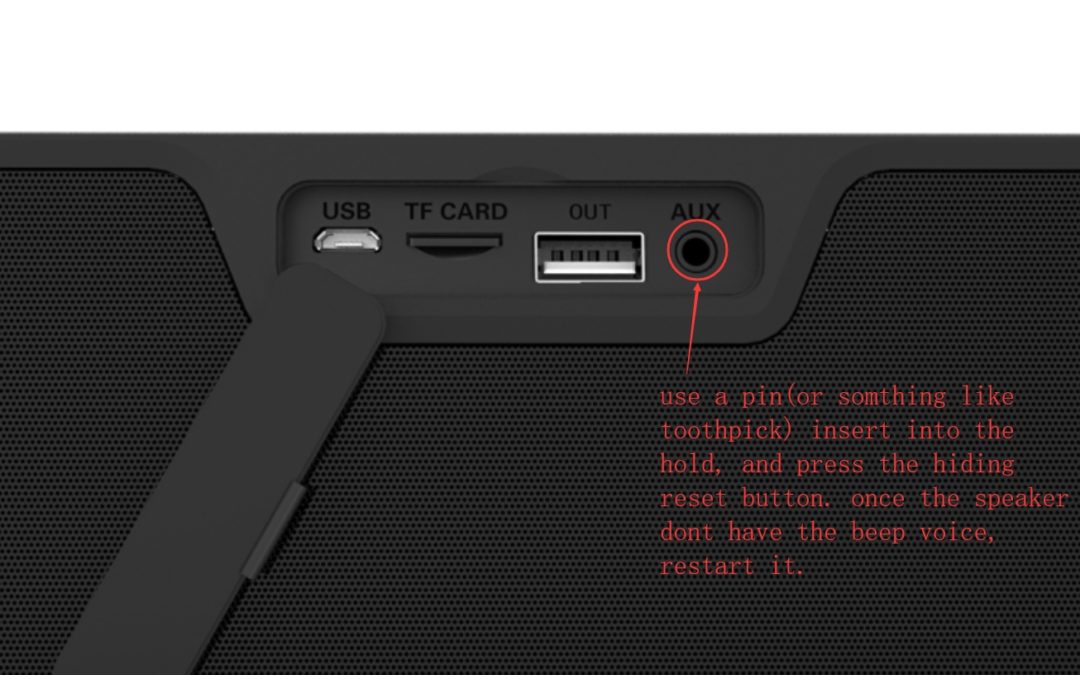
o Before contacting us for warranty, reset the speaker by inserting a needle or toothpick into the auxiliary jack and wait for a few seconds until the speaker is reset.

Frequently Asked Questions
1. What should be done if the Bluetooth speaker cannot be turned on?
Make sure the Bluetooth speaker has enough battery capacity.
2. What should be done if the Bluetooth speaker cannot pair with Bluetooth device?
Make sure if it is in pairing mode.
The Bluetooth device may be out of range move it closer and try again.
3. What should be done if there is no audio out from the speaker?
Make sure if it is not muted or very low volume.
Make sure the Bluetooth device is playing audio files and make the volume much higher.
Your Bluetooth device may be out of range move it closer and try again.
4. What should be done if there is poor sound quality?
The Bluetooth device may be out of range. Move it closer and try again.
Keep your Bluetooth device and this speaker away from any device that generates electromagnetic interference, such as another Bluetooth device, cordless phone, microwave oven or wireless router.
Make sure the music file is in good quality.